
Read this page once before you set anything up. Every screen in Magic Agent builds on these ideas.

Workspace

A workspace is your business inside Magic Agent. It holds your company profile, agents, catalogue, knowledge base, channels, conversations and team. Nothing is shared between workspaces. If you run two businesses, each gets its own workspace.

The front desk and specialist agents

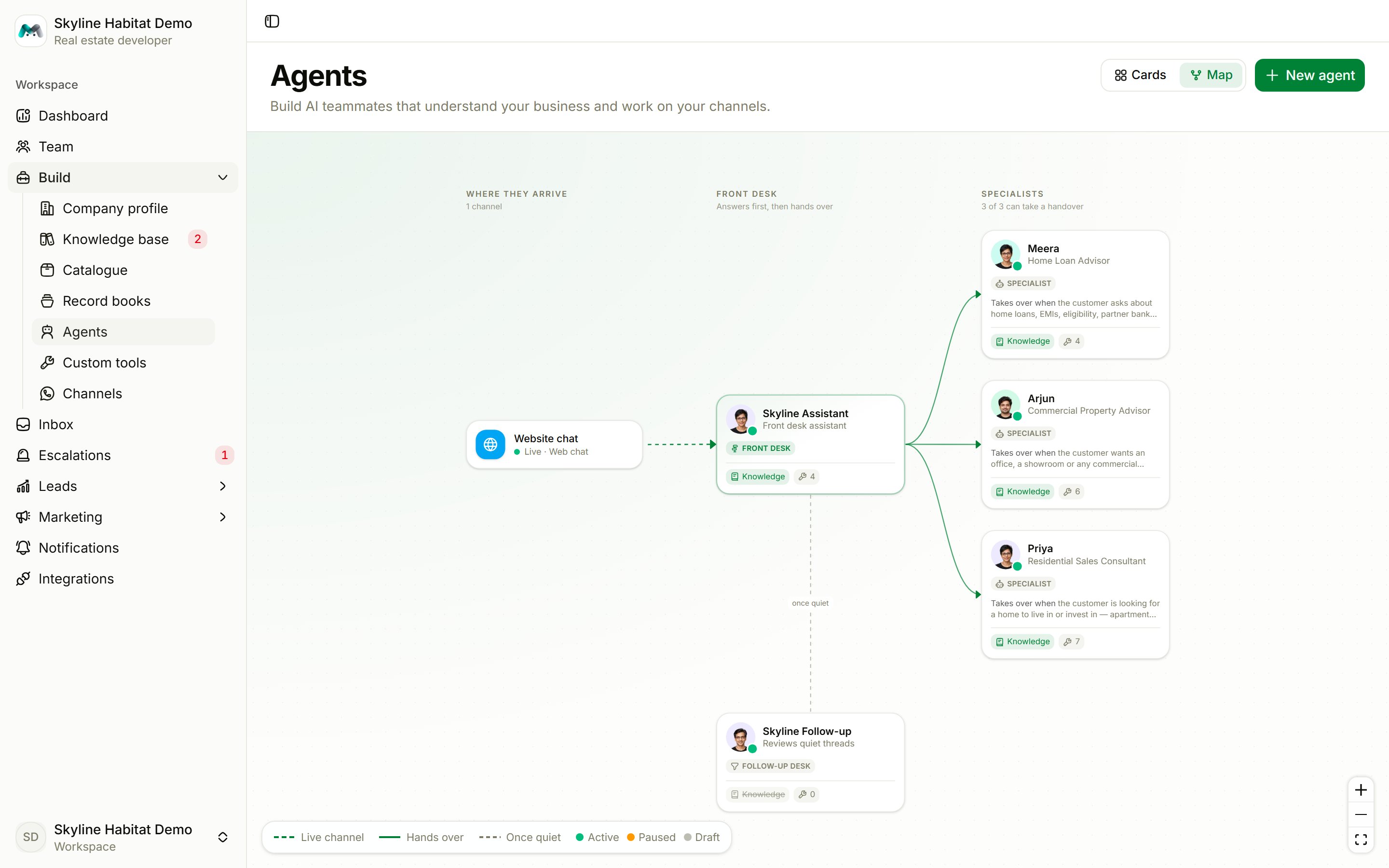
Every workspace has one front desk. It answers first on every channel, works out what the customer needs, and silently hands the conversation to the specialist agent best placed to help. The customer never sees the handover; the conversation simply continues. The agent map: the website chat goes to the front desk, which routes to three specialists In the Skyline Habitat demo: The front desk chooses a specialist only from each agent’s “Hand over to me when…” line. An agent without that line, or one that is still a draft, gets no conversations. See Agents.
The two background desks

Two more desks come with your workspace and never chat with customers live:

What agents may say

Agents answer only from what you give them:
  • Company profile and facts: who you are, hours, policies. Read by every agent on every reply.
  • Catalogue: the products and services you sell. Agents refuse to discuss anything not in the catalogue, and never quote a price that is not stored on the product.
  • Knowledge base: FAQs, policies, pages and documents the agents search when they need an answer.
When an agent cannot answer, it says so, tells the customer the team will follow up, and logs a knowledge gap for you to fill.

Record books

A record book is something your agents collect and file, such as an order, a site visit, an appointment or a callback request. You decide what details to collect and what stages a record moves through. Agents then fill these in during conversations. Every workspace has an Orders book for things sold from the catalogue. Add your own books for everything else. See Record books.

Leads

Every conversation is also a lead. The follow-up desk files each one at a stage in your pipeline, such as New enquiry, Qualified, Site visit booked, Won or Lost. It matches the conversation against each stage’s description, so the descriptions you write are what drive the pipeline. See Leads.

Channels

A channel is a way customers reach you: a WhatsApp number, an Instagram account, a Telegram bot, an RCS sender, a website chat widget, an AI voice widget or a phone line. Each channel points to an agent, normally the front desk. See Channels.

Human takeover

You and your team can reply in any conversation at any time. Your reply takes over the chat: the agent pauses (one hour by default) and then takes the chat back on its own, unless you hand it back sooner. When an agent escalates a conversation, it lands in Escalations.

The 24-hour WhatsApp window

WhatsApp only delivers free-form replies within 24 hours of the customer’s last message. Outside that window, only approved templates go through. This is why marketing messages, alerts and late follow-ups always use templates. See Templates.